
The name reverse proxycomes down to who the proxy server is protecting and acting on behalf of. It is named in direct contrast to a traditional “forward” proxy.
Here is the breakdown of why the name makes sense:
- A regular (Forward) Proxy acts for the Client: It sits in front of users. When you use a forward proxy, it intercepts your outbound request, hides your identity, and talks to the internet on your behalf. The internet thinks the proxy is making the request.
- A Reverse Proxy acts for the Server: It flips that relationship entirely. It sits in front of web servers. When internet users try to access a website, the reverse proxy intercepts the inbound request, hides the server’s identity, and talks to the user on the server’s behalf. The user thinks the proxy is the actual website.
The Analogy
- Forward Proxy (Like a Personal Assistant): You want to buy a secret item from a store. You send your assistant (the proxy) to the store to buy it for you. The store clerk sees the assistant, but has no idea who the real buyer is.
- Reverse Proxy (Like a Security Guard / Concierge): You want to talk to the CEO of a company. You cannot walk straight into their office. You must talk to the front desk concierge (the reverse proxy) first. The concierge takes your message, goes into the back room to get the answer, and brings it back to you. You get what you need, but you never actually see the CEO or know which room they are in.
Because it performs the exact same middleman function as a standard proxy but operates in the reverse direction (shielding the destination instead of the source), it earned the name reverse proxy.
The Real-World Analogy: Ordering Food at a Fast Food Drive-Thru
Imagine you want to buy a burger from a fast-food restaurant.
- The Client (You): You drive up to the speaker box outside.
- The Reverse Proxy (The Speaker Box / Order Taker): You talk into the speaker. You tell this box exactly what you want. You don’t know who is on the other side, and you can’t see into the kitchen. To you, the speaker box is the restaurant.
- The Backend Servers (The Kitchen Staff): Behind the scenes, the order taker sends your request to the kitchen. There are three chefs inside: one makes burgers, one fries chips, and one pours drinks.
- The Response: The chefs hand the food to the order taker, who passes it through the window to you.
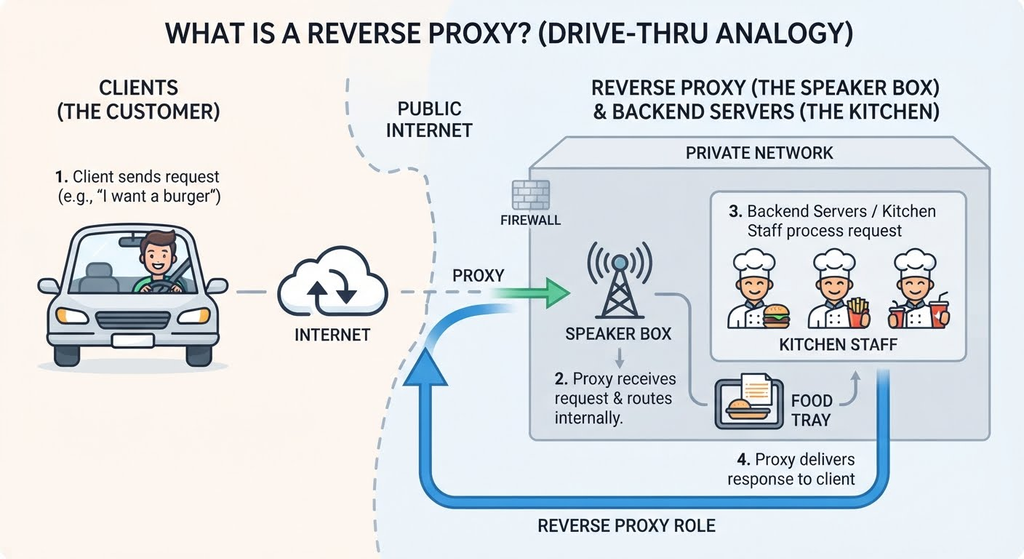
Why this is a “Reverse” Proxy:
You never walked into the kitchen, you never saw the chefs, and you don’t know which specific chef made your burger. The kitchen staff are entirely hidden and protected from the public. The speaker box acted on behalf of the kitchen.
How the Data Flows
The data path always follows a structured, centralized loop to keep the backend infrastructure completely isolated:
 [ Internet Users ]
     │       ▲
     │ (1)   │ (4)
     ▼       │
┌─────────────────────────┐
│  REVERSE PROXY SERVER   │  <-- Publicly visible IP (e.g., NGINX)
└─────────────────────────┘
     │       ▲
     │ (2)   │ (3)
     ▼       │
 ┌───────────┴───────────┐
 │   PRIVATE NETWORK     │  <-- Hidden behind a firewall
 │                       │
 │  ┌─────────────────┐  │
 │  │  Web Server A   │  │
 │  └─────────────────┘  │
 │  ┌─────────────────┘  │
 │  │  Web Server B   │  │
 │  └─────────────────┘  │
 └───────────────────────┘
- Step 1: The Client sends a request over the internet to a website (e.g.,
example.com). This request hits the Reverse Proxy public IP address. - Step 2: The Reverse Proxy intercepts the request, checks its health/rules, and routes the request internally to one of the hidden Web Servers.
- Step 3: The internal Web Server processes the request and sends the data back to the Reverse Proxy.
- Step 4: The Reverse Proxy delivers the data back to the Client. The user gets their web page without ever knowing Web Server A or B exists.